
Thursday, I watched something I already knew in theory play out in real time. Teams meetings kept working and Teams chats seemed to work too, but I wasn’t confident people were actually receiving them, so I started asking coworkers to confirm they’d got the message. Outlook and Microsoft Copilot were a different story. The hardest part wasn’t the outage itself. It was figuring out how to tell people that Microsoft 365 services are down, and that IT had no control over it.
Microsoft 365 Services Are Down – What Happened
Update pending (November 15, 2026): Microsoft’s post-incident review. Microsoft has shared a preliminary root cause, which is below. Microsoft says it will publish a final one within five business days. I’ll update this post when the final review is published.
A global Microsoft 365 incident officially started Thursday, November 12, 2026, at 10:17 AM Central Time, although services started becoming unavailable before that time. Microsoft is tracking it as EX1550543 for Exchange Online, and MO1550821 for other Microsoft 365 services that interact with Exchange. People couldn’t reliably get into their mailboxes, and email delivery was delayed and eventually stopped.
Microsoft’s own updates drew a useful line: features that interact with Exchange and email were impacted, and features that don’t mostly kept working. That matches what I saw too: Teams meetings stayed up; Calendars, meeting scheduling, and Microsoft Copilot did not.
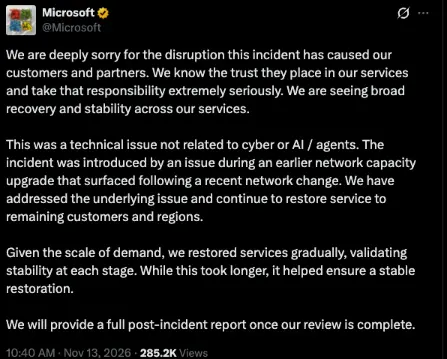
Microsoft closed both incidents late Friday night, November 13, and early Saturday morning posted that it had restored service to the remaining impacted customers and regions. Microsoft’s preliminary root cause is a failure in the systems that establish secure connections to the service. Traffic shifts during standard network maintenance and upgrades exposed a latent bug, and Microsoft said the incident “was introduced by an issue during an earlier network capacity upgrade that surfaced following a recent network change.” Microsoft again said there was no malicious activity, calling it “a technical issue not related to cyber or AI / agents.” On Friday, Microsoft also posted on X to apologize to customers and partners. That’s Microsoft’s preliminary finding, but the investigation is far from finished. I’ll wait for the post-incident review before saying anything stronger about the cause.
Email Is Still the Hub
I still believe Exchange remains the most important communication tool in Microsoft 365, and Thursday was a demonstration, not a theory. We talk in Teams, but so much of the platform still hangs off the user’s mailbox. Microsoft confirmed that Teams calendar and meeting scheduling, Copilot’s access to work email and files, Planner, To Do, and mail flow were all affected.
“We use Microsoft 365” is not a dependency map. You need to know the functions that all play into running your organization: which apps send password resets, notifications, or operations links to the user’s mailbox. Those platforms are just as important to map out, along with the Microsoft systems.
Entra ID was not on Microsoft’s official impact list, and I do not believe that sign-in went down. It is still worth asking the what-if: if Entra, or the mailbox you use for MFA and account recovery, were unavailable, which of your third-party systems would become unavailable too?
“Let’s Just Email Everybody”
The biggest challenge I ran into was communication to the organization about the event. We couldn’t get into the Microsoft 365 admin center, so we couldn’t post an organizational message to the service landing pages. Even if we had gotten in, I’m not sure those messages would have worked. We wanted people to know this was a Microsoft outage, that IT had no control over it, and that opening an internal ticket wasn’t going to get them a fix.
Companies need an alternative way to reach users when Microsoft 365 is the thing that’s down. That can be a system-wide emergency phone call or text, or a post on another internal website your users already use. Don’t fall for the folly of “let’s just email everybody,” because email was down too.
I also had some meetings cancelled because the purpose was to review information that wasn’t opening easily, or the systems we wanted to discuss were down.
Where Do You Get Updates When the Admin Center Is Down?
A related problem caught a lot of organizations, including us: getting updates from Microsoft. Normally I’d go to Service health and Message Center in the admin center, but the admin center was inaccessible. So, I was left hunting for other sources.
The first stop was the public status page at status.cloud.microsoft. Even that gave me a little trouble at first, which tells you how many people were hitting it at the same time. The Microsoft 365 Status (@MSFT365Status) was posting updates, and Downdetector also showed which Microsoft services people were having issues with.
My advice: bookmark those sources now and put them in your IT runbook before the next outage. Don’t count on a Message Center email to tell you that email is down.
Final Thoughts
Outages will happen. The companies that fare better already know which wires are shared and already have a way to talk to people that doesn’t start in Outlook. This wasn’t just a work outage, and I wrote about the personal side here: When Outlook.com Went Dark: What the Outage Meant at Home.
Let me know what you think!
Learn more:

