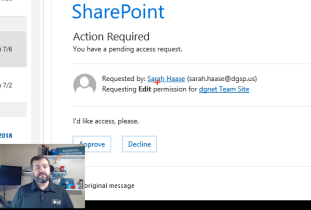
During a recent intranet deployment project, a client asked what would happen if she clicked the ‘Accept’ link on the SharePoint access request email she received from one of her coworkers. She was a bit surprised by my answer and after that conversation, I thought it would be good to do a quick video explaining the process. What permissions do users get if you accept their access request? How are those users managed on the SharePoint site and is there a best practice for managing access requests? Watch the video below to find out!
-
-
How to share SharePoint Online sites with external users
I created a new SharePoint Online Communications site recently and I wanted to share it with someone outside my organization. Unfortunately, when I tried to share the site with them, I received an error! The error, “Your organization’s policies don’t allow you to share with these users. Go to External Sharing in the Office 365 admin center to enable it.“, is pretty straightforward and to the point: external sharing is turned off for Office 365 and I need to enable it….or is the error wrong?!? Check out my video below where I show the issue and how to enable external sharing in SharePoint Online.
-
Fix Project Site Timeline Web Part Error
I received an error when creating a SharePoint online site using the ‘project site’ template and thought I would share my quick fix to make it work. Check out the quick video below for the details!
-
Talking Microsoft Teams adoption with Erica Toelle
I had a chat with Erica Toelle [Twitter] at SharePoint Saturday (SPS) St. Louis and we talked about Microsoft Teams adoption. The video and some key highlights are below: 01:10 User categories for adoption 01:33 Erica’s number 1 tip for adopting Microsoft Teams 01:56 Video in Teams can be that ‘sticky’ feature 03:24 I ask: Is Teams flexible enough for all users in an organization 04:25 Teams can work organically with your working group
-
Planning is key for all migrations to Office 365
I had a chat with Mike Maadarani [Twitter] at SharePoint Saturday (SPS) St. Louis about SharePoint migrations and his strategies for helping organizations moving to the cloud. The video and some key points are below: 00:48 Big challenge when migrating SharePoint 01:15 Unlocking the new features in SharePoint & adoption 02:08 For SharePoint migrations, clicking the button is the easy part 03:43 First thing to do before migrating… 04:37 What are users often confused about with Office 365
-
SharePoint Conference 2018
I will be attending and speaking at this year’s SharePoint Conference North America happening May 19 – 23, 2018. This is going to be an amazing #SPC – you will have access to over 100 Microsoft product team members (the ladies and gentlemen who are building SharePoint, OneDrive, etc.), as well as dozens of Microsoft MVPs. Bring your tough questions and build your network at this amazing, unique conference. You can register for the conference using my code GLENN to receive $50 off!! Register here: SharePointNA.com Check out my video below describing why I am excited about the conference and the sessions I am giving:
-
SharePoint Fest Chicago 2017
For the latest 365EduCon information (formerly SharePoint Fest), go to this page: 365EduCon Information and Discount Code [UPDATE] I had a great time spending my week with the attendees at SharePoint Fest Chicago! The #SPFest team always does a good job organizing the events and this time was no different. We had a blast at last night’s #spfestchicago speaker reception! We are thankful for each and every one of our speakers! pic.twitter.com/uhJvnhHdEt — SharePoint Fest (@SharePointFest) December 7, 2017 I had a great group of attendees who filled the room during my Thursday session. Packed house for @DanielGlenn talking #Flow – #PowerApps – and connecting to your on-premises data #SPFestChicago…